- Basically, string is a sequence of characters but it’s not a primitive type.
- When we create a string in java, it actually creates an object of typeString.
- String is immutable object which means that it cannot be changed once it is created.
- String is the only class where operator overloading is supported in java. We can concat two strings using + operator. For example
"a"+"b"="ab".
There are two ways to create a String object:
- By string literal : Java String literal is created by using double quotes.
For Example: String s=“Welcome”; - By new keyword : Java String is created by using a keyword “new”.
For example: String s=new String(“Welcome”);
It creates two objects (in String pool and in heap) and one reference variable where the variable ‘s’ will refer to the object in the heap.
Now, let us understand the concept of Java String pool.
Java String Pool: Java String pool refers to collection of Strings which are stored in heap memory. In this, whenever a new object is created, String pool first checks whether the object is already present in the pool or not. If it is present, then same reference is returned to the variable else new object will be created in the String pool and the respective reference will be returned. Refer to the diagrammatic representation for better understanding:
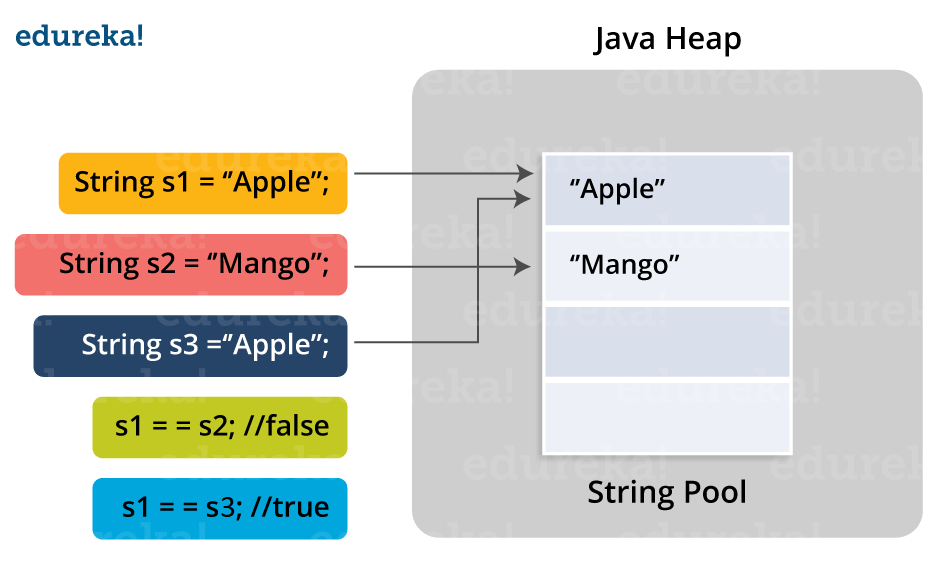
In the above image, two Strings are created using literal i.e “Apple” and “Mango”. Now, when third String is created with the value “Apple”, instead of creating a new object, the already present object reference is returned. That’s the reason Java String pool came into the picture.
Before we go ahead, One key point I would like to add that unlike other data types in Java, Strings are immutable. By immutable, we mean that Strings are constant, their values cannot be changed after they are created. Because String objects are immutable, they can be shared. For example:
String str =”abc”;
is equivalent to:
char data[] = {‘a’, ‘b’, ‘c’};
String str = new String(data);
Let us now look at some of the inbuilt methods in String class.
Java String Methods
- Java String length():
- The Java String length() method tells the length of the string. It returns count of total number of characters present in the String.
public class Example{
public static void main(String args[]{
String s1="hello";
String s2="whatsup";
System.out.println("string length is: "+s1.length());
System.out.println("string length is: "+s2.length());
}}
Here, String length() function will return the length 5 for s1 and 7 for s2 respectively.
Java String compareTo():
The Java String compareTo() method compares the given string with current string. It is a method of ‘Comparable’ interface which is implemented by String class. Don’t worry, we will be learning about String interfaces later. It either returns positive number, negative number or 0. For example:
public class CompareToExample{
public static void main(String args[]){
String s1="hello";
String s2="hello";
String s3="hemlo";
String s4="flag";
System.out.println(s1.compareTo(s2));
System.out.println(s1.compareTo(s3));
System.out.println(s1.compareTo(s4));
}}
Java String toLowerCase() :
The java string toLowerCase() method converts all the characters of the String to lower case. For example:
public class StringLowerExample{
public static void main(String args[]){
String s1="HELLO HOW Are You?”;
String s1lower=s1.toLowerCase();
System.out.println(s1lower);}
}

The above code will return “hello how are you”.
Java String toUpper() :
The Java String toUpperCase() method converts all the characters of the String to upper case. For example:
public class StringUpperExample{
public static void main(String args[]){
String s1="hello how are you";
String s1upper=s1.toUpperCase();
System.out.println(s1upper);
}}
The above code will return “HELLO HOW ARE YOU”.
Java String equals() :
The Java String equals() method compares the two given strings on the basis of content of the string i.e Java String representation. If all the characters are matched, it returns true else it will return false. For example:
public class EqualsExample{
public static void main(String args[]){
String s1="hello";
String s2="hello";
String s3="hi";
System.out.println(s1.equalsIgnoreCase(s2));   // returns true
System.out.println(s1.equalsIgnoreCase(s3));   // returns false
}
}- Java String ValueOf():
- This method converts different types of values into string.Using this method, you can convert int to string, long to string, Boolean to string, character to string, float to string, double to string, object to string and char array to string. The signature or syntax of string valueOf() method is given below:
public static String valueOf(boolean b)
public static String valueOf(char c)
public static String valueOf(char[] c)
public static String valueOf(int i)
public static String valueOf(long l)
public static String valueOf(float f)
public static String valueOf(double d)
public static String valueOf(Object o)
Let’s understand this with a programmatic example:
public class StringValueOfExample{
public static void main(String args[]){
int value=20;
String s1=String.valueOf(value);
System.out.println(s1+17);       //concatenating string with 10
}}

In the above code, it concatenates the Java String and gives the output – 2017.- public String substring(int startIndex):
This method returns new String object containing the substring of the given string from specified startIndex (inclusive). The method throws an IndexOutOfBoundException when the startIndex is larger than the length of String or less than zero. - public String substring(int startIndex, int endIndex):
This method returns new String object containing the substring of the given string from specified startIndex to endIndex. The method throws an IndexOutOfBoundException when the startIndex is less than zero or startIndex is greater than endIndex or endIndex is greater than length of String.
References:
https://www.edureka.co/blog/java-string/
https://www.digitalocean.com/community/tutorials/java-string
 I LOVE writing
Leave a comment